
Course Module - Assignment
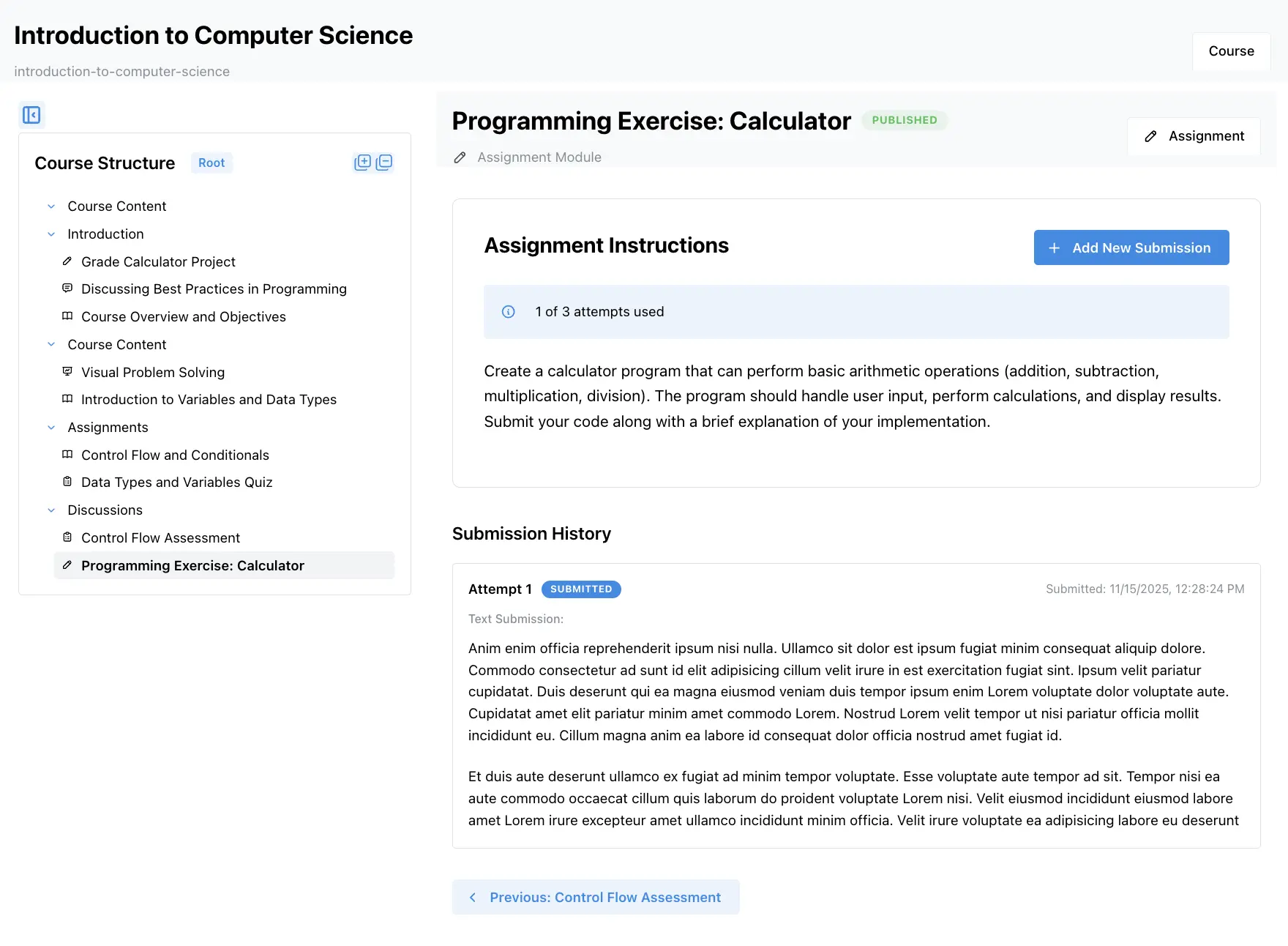
When an Assignment module is linked to a course, it becomes a course module with course-specific settings. Students enrolled in the course can view the assignment and create submissions, which instructors can then grade and provide feedback on.
Course-Specific Settings
Section titled “Course-Specific Settings”When an assignment module is added to a course, you can configure course-specific settings that apply only to that course:
Submission Dates
Section titled “Submission Dates”- Open date: When students can start submitting
- Due date: When the assignment is due
- Cutoff date: When submissions are no longer accepted (even if late submissions are allowed)
Module Name Override
Section titled “Module Name Override”- Custom name: Override the default module name for this course
- Useful when the same module serves different purposes in different courses
Other Settings
Section titled “Other Settings”- Attempt limits: Course-specific attempt restrictions
- Grading options: Course-specific grading configurations
- Visibility: Control when the module is visible to students
These settings allow you to customize the same assignment module differently for each course where it’s used.
Student Submissions
Section titled “Student Submissions”Students enrolled in the course can create submissions for the assignment module. Each submission is tied to:
- The course module (the assignment as it appears in this course)
- The student who created the submission
- The submission date and time
Creating a Submission
Section titled “Creating a Submission”Students can create submissions by:
- Navigating to the assignment module in the course
- Clicking “Submit Assignment” or “Add Submission”
- Uploading files or entering text (depending on assignment configuration)
- Submitting their work
Submission Types
Section titled “Submission Types”Submissions can include:
- File uploads: Documents, images, code files, etc.
- Text responses: Written answers entered directly in the editor
- Multiple files: If the assignment allows multiple file uploads
- Attachments: Additional supporting materials
Attempt Tracking
Section titled “Attempt Tracking”The system tracks all submission attempts:
- Attempt history: View all previous attempts
- Latest submission: See the most recent submission
- Attempt limits: Respect course-specific attempt restrictions
- Submission status: Track whether submissions are draft or submitted
Viewing and Managing Submissions
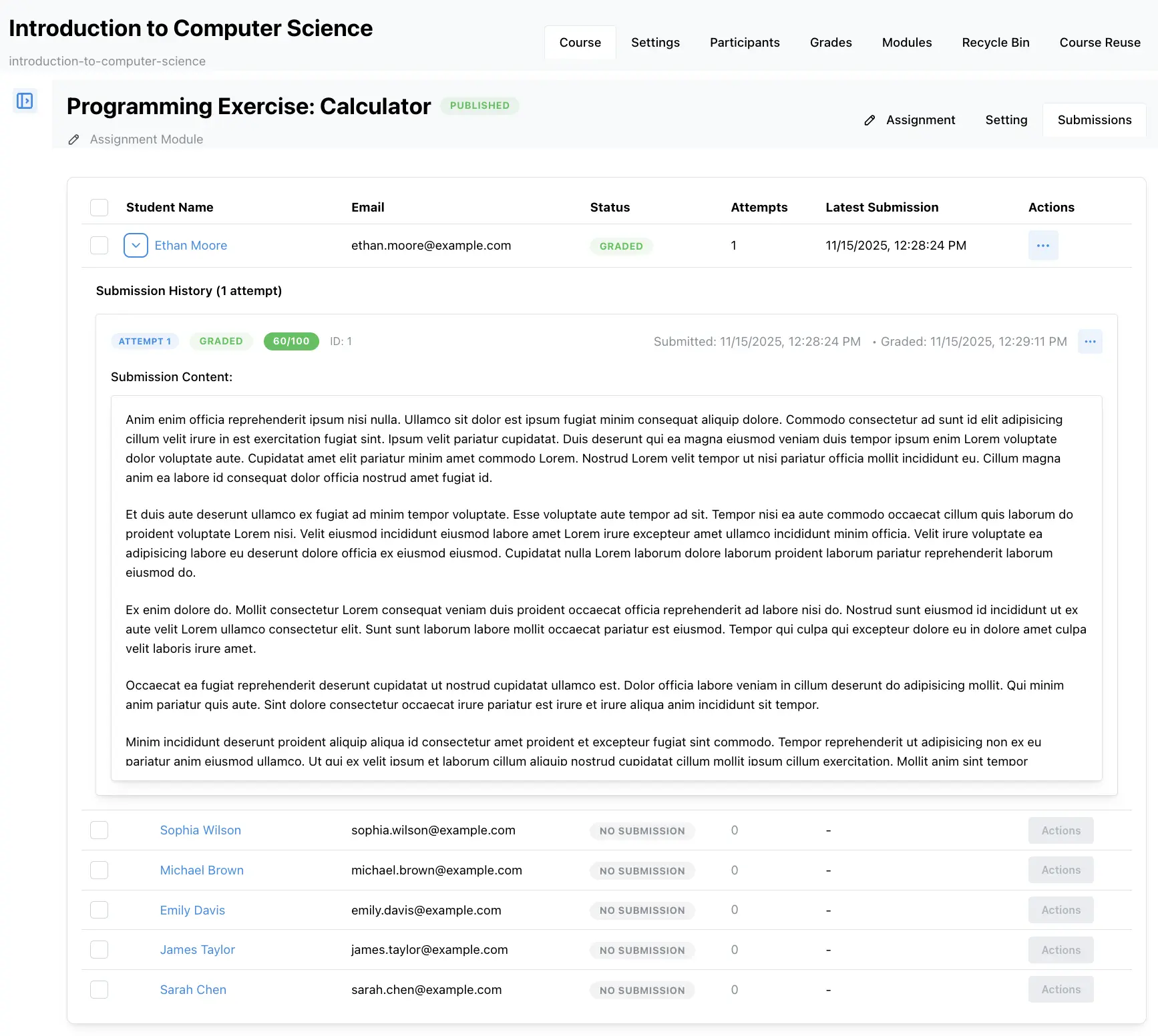
Section titled “Viewing and Managing Submissions”Instructors can view and manage all submissions for the course module:
Submission List
Section titled “Submission List”- All submissions: View all student submissions for the assignment
- Filter by status: Filter by submitted, draft, or graded
- Sort options: Sort by student name, submission date, or grade
- Search: Find specific submissions
Individual Submission View
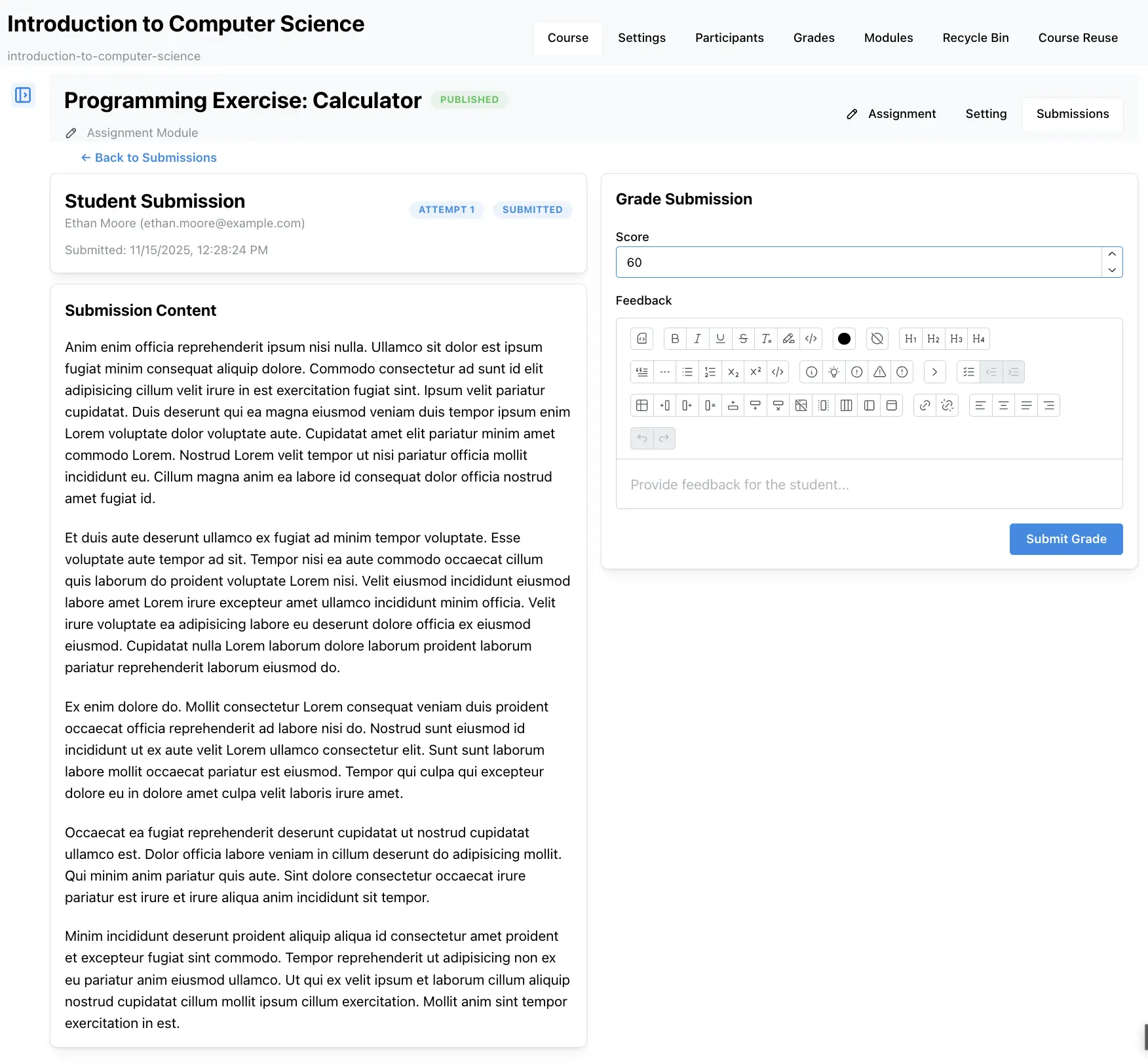
Section titled “Individual Submission View”When viewing a submission, instructors can:
- View submitted files: Download and review student work
- Read text responses: Review written submissions
- Grade the submission: Assign points and provide feedback
- Add comments: Provide inline or overall feedback
- View attempt history: See all previous attempts from the student
Grading Submissions
Section titled “Grading Submissions”Instructors can grade submissions using various methods:
Point-Based Grading
Section titled “Point-Based Grading”- Assign points: Give a numerical score
- Maximum points: Set based on assignment configuration
- Partial credit: Award partial points when appropriate
Rubric-Based Grading
Section titled “Rubric-Based Grading”- Use rubrics: Apply grading rubrics for consistent evaluation
- Criteria-based: Grade against specific criteria
- Detailed feedback: Provide feedback for each rubric criterion
Feedback
Section titled “Feedback”Provide feedback on submissions:
- Overall feedback: General comments on the entire submission
- Inline comments: Comments on specific parts of the submission
- Grade comments: Comments included with the grade
- File attachments: Attach feedback files or examples
Submission Status
Section titled “Submission Status”Submissions can have different statuses:
- Draft: Student is still working on the submission
- Submitted: Student has submitted their work
- Graded: Instructor has graded the submission
- Returned: Grade and feedback have been returned to the student
Best Practices
Section titled “Best Practices”When working with assignment course modules:
- Set clear due dates: Help students manage their time effectively
- Use cutoff dates: Allow flexibility while maintaining course structure
- Provide clear instructions: Ensure students understand what to submit
- Grade consistently: Use rubrics for consistent evaluation
- Provide timely feedback: Return graded work promptly
- Monitor submissions: Check for late or missing submissions regularly
